
How to Start a Podcast in 2026 — Complete Guide

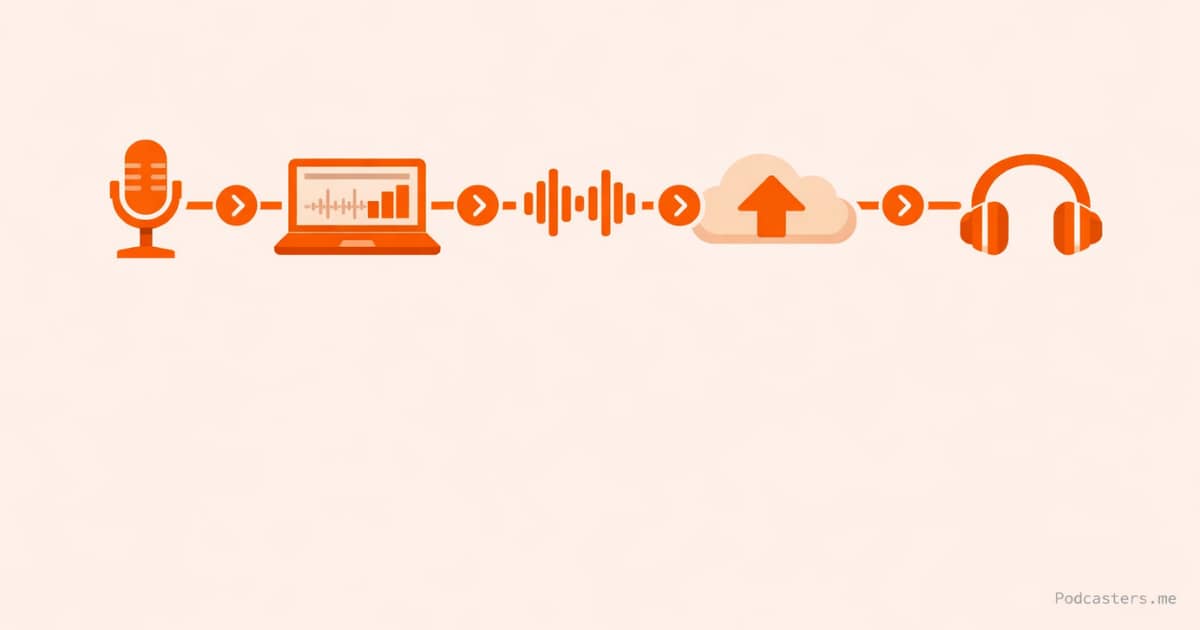
Published: April 2026 | Written by: Steve Atwal | Category: Beginner's Guide
Starting a podcast in 2026 is easier than it has ever been. The barrier is no longer technical — it is knowing which decisions to focus on and which ones do not matter yet. This guide walks you through every step, with honest tool recommendations at each stage.
There are over 5 million podcasts in existence. Most of them stop publishing within the first ten episodes. The ones that make it past that are not necessarily the best-produced shows — they are the ones that built a sustainable process from the start.
This guide gives you that process. From equipment and format decisions through to publishing your first episode and growing your audience, every step is covered here in the order you should tackle it.
Step 1 — Define Your Show Before You Buy Anything
The most common mistake new podcasters make is buying equipment before they have clarity on what their show actually is. The gear decision is almost irrelevant compared to getting the format right from the beginning.
Answer these questions before you spend anything:
- Who is this show for? Not "anyone interested in X" — be specific. What does this person already know? What are they trying to figure out?
- What format will you use? Solo commentary, interview, co-hosted, or narrative storytelling. Each has different production requirements and audience expectations.
- How long will episodes be? Commit to a format before you start, and stick to it. Consistency matters more than length.
- How often will you publish? Weekly is the most common cadence for growing shows. Fortnightly is sustainable for solo creators with demanding production. Monthly rarely builds momentum.
- What will you call it? A clear, searchable name wins over a clever one. Searchability matters on Apple Podcasts and Spotify more than most new podcasters realize.
Most podcasters who quit do so because they ran out of episode ideas or found the production workload unsustainable. Planning your format and content structure properly before you start is the single best investment of time you can make.
Step 2 — Set Up Your Website First
Your podcast website is the one platform you own. Apple Podcasts and Spotify can change their algorithms, demonetize content, or shut down — your website cannot be taken from you. Getting this set up before you launch also means you have a home base to send people to from day one.
The recommended approach for most podcasters in 2026 is WordPress on a self-hosted domain. It gives you full control over your content, your SEO, and your audience data. The setup requires a hosting provider and a domain name — most hosting platforms bundle both.
Recommended web host: Bluehost
Bluehost is one of the most established WordPress-recommended hosting providers and among the most straightforward to set up for a first website. You get one-click WordPress installation, a free domain for the first year, and enough server resources to run a podcast website without performance issues. Their entry plans are well-priced for a project that is starting without an audience.
Once your site is up, install a basic podcast theme or use a clean multipurpose theme. You do not need anything elaborate. A homepage, an About page, and an Episodes or Blog section where you publish show notes is all you need at launch.
Step 3 — Choose Your Recording Setup
Solo Shows — What You Actually Need
For a solo podcast, the equipment list is short:
- USB microphone — The Audio-Technica ATR2100x or the Blue Yeti Nano are reliable entry-level choices. USB means you plug directly into your laptop — no audio interface required.
- Quiet room — Soft furnishings absorb echo. A bedroom with clothes, curtains, and a bed will sound better than a hard-surfaced office every time.
- Recording software — Audacity is free and adequate. GarageBand works well on Mac. You do not need to buy software to start.
Interview Shows — Remote Recording
If you are recording conversations with guests remotely, the biggest risk is audio quality degrading over an internet connection. The solution is a tool that records locally on each participant's device rather than capturing the audio over the call.
Recommended: Riverside.fm
Riverside records in high-quality audio and video on each participant's device and syncs the files after the session. Even if your guest's internet drops mid-conversation, their local recording is preserved. Add AI-powered noise cleanup (Magic Audio), unlimited transcription, and transcript-based editing, and Riverside is the most capable remote recording platform available for podcasters who care about audio quality.
Riverside also has a free plan, making it a sensible starting point before committing to a paid tier.
All-in-One Option for Beginners: Alitu
If the idea of recording, editing, and publishing across multiple tools feels overwhelming, Alitu is worth serious consideration. Alitu handles the full production workflow — recording, automatic cleanup, editing, and publishing — from a single browser-based tool. It is the most beginner-friendly option available in 2026 for podcasters who want to spend time on content rather than production logistics.
Step 4 — Choose a Podcast Hosting Platform
Your podcast host stores your audio files and generates the RSS feed that distributes your show to Apple Podcasts, Spotify, Amazon Music, and every other directory. This is a non-negotiable part of the infrastructure.
Your website and your podcast host are separate things. Your host manages the feed; your website publishes show notes and helps listeners find you via search.
There are two platforms worth serious consideration for most new podcasters:
Captivate — Best for Growth-Focused Podcasters
Captivate gives you every feature on every plan — dynamic ad insertion, IAB-certified analytics, private feeds, and unlimited podcasts — regardless of which pricing tier you choose. The only variable is your monthly download allowance. For a new show that plans to grow and eventually pursue sponsorships, the analytics quality and monetization tools available from day one make Captivate the stronger choice.
The 30-day free trial is also one of the most generous in the category.
Start your free 30-day Captivate trial →
Castos — Best for WordPress Users
If your website runs on WordPress, Castos is the clearest choice. The Seriously Simple Podcasting plugin integrates your Castos account directly into your WordPress dashboard — upload episodes, manage your feed, and check analytics without leaving your site. You also get unlimited downloads at a flat monthly price, so there are no overage charges as your audience grows.
Start your free 14-day Castos trial →
Step 5 — Record Your First Episodes
Before you launch publicly, record at least three episodes. This gives your first listeners somewhere to go after they finish your debut episode, and it gives you time to refine your format before it is public.
A few things that improve first-episode quality significantly:
- Record a proper intro and outro — even a 20-second intro with your show name, who it is for, and what listeners will get is better than starting cold.
- Script the first minute — the opening of an episode is when listeners decide whether to keep going. Know exactly what you will say for the first 60 seconds.
- Do a test recording and listen back — awkward pauses, room echo, and pacing issues are much easier to catch on playback than during the session.
- Remove filler words in editing — "um", "uh", and long silences can be cut without affecting the listener experience. Removing them is one of the highest-value edits you can make.
Step 6 — Create Your Cover Art
Your cover art appears in Apple Podcasts, Spotify, and every directory your show is listed in. It is the first visual impression most potential listeners will have of your show, and it matters more than most new podcasters give it credit for.
Specifications to hit:
- Square format — 1:1 aspect ratio
- 3000x3000px (Apple Podcasts minimum is 1400x1400px, but 3000x3000px is the recommended standard)
- JPEG or PNG, under 500KB
Design principles that work at small sizes:
- High contrast between background and text — it needs to be legible as a thumbnail
- Show name readable at 100x100px — test it small before committing
- Avoid too much text — show name and a tagline or image is usually enough
- Unique enough to be distinguishable in a grid of covers in your genre
Canva has solid podcast cover art templates. For a more custom result, a freelance designer on Fiverr or Upwork can produce professional artwork for under $50.
Step 7 — Publish and Submit to Directories
Once your first episodes are recorded, edited, and your podcast host is set up, it is time to publish your first episode and submit your RSS feed to the major directories.
Priority submissions:
- Apple Podcasts — via podcasters.apple.com (review takes 1-5 business days)
- Spotify — via podcasters.spotify.com (usually live within 24 hours)
- Amazon Music / Audible — via music.amazon.com/podcasts
Most podcast hosts (including Captivate and Castos) streamline this process with one-click or guided submission flows. Your RSS feed URL from your host is all you need to submit to each platform.
Do not wait for all directories to approve before you tell people. Spotify approval is usually fast — once your show is live there, you can start sharing it.
Step 8 — Write Show Notes That Help Listeners Find You
Show notes live on your podcast website and are indexed by search engines. They are one of the most underused growth tools available to independent podcasters, and they cost almost nothing to produce once you have a transcript.
A basic show notes template that works for search:
- Episode title (keyword-optimized where possible)
- 2-3 paragraph summary of what the episode covers
- Key points or timestamps
- Links to resources mentioned in the episode
- Guest bio and links (for interview shows)
- Embed or link to listen on Apple Podcasts and Spotify
AI tools built into platforms like Captivate and Castos can generate a first draft of show notes from a transcript in seconds. Even if you edit them significantly, starting from a draft is faster than writing from scratch every episode.
Step 9 — Build a Publishing Routine
Consistency matters more than quality for the first six months. A show that publishes every Tuesday at 6am builds audience habits in a way that an inconsistent publishing schedule never does. Listeners who find your show in episode 12 are deciding whether to subscribe based partly on whether they trust you will keep showing up.
Batch recording — recording two or three episodes in a single session — is the most reliable way to stay ahead of your schedule. Even recording one episode ahead gives you a buffer that removes the weekly pressure of producing something new from scratch.
The podcasters who make it to episode 50 are almost never the ones who started with the best equipment or the most polished audio. They are the ones who built a sustainable production routine and kept publishing regardless of how the early numbers looked.
Step 10 — Grow Your Audience
Growth in podcasting is slower than most platforms and faster than most people think — once the fundamentals are in place. The channels worth focusing on in 2026:
Search (Apple Podcasts, Spotify, Google) — Optimize your episode titles and show notes for the terms your target listener is actually searching. Think "how to edit podcast audio" rather than "Episode 12 — My Editing Workflow." Your show description in your hosting platform is also indexed — treat it like a search page, not a marketing brochure.
Guest appearances — Appearing on other podcasts in your genre is one of the highest-leverage growth activities available. You are reaching an audience that already listens to podcasts and is interested in your topic. Pitch shows that are slightly larger than yours — the ideal swap is mutually beneficial, not a favour.
Short-form clips for social — Extract a 60-90 second clip with a strong hook or surprising insight from each episode. This is where tools like Riverside and Descript add real value — they make clip creation fast enough that it can be part of your standard publishing workflow.
Email newsletter — An email list is the one audience channel you own. Even a basic weekly or fortnightly email pointing subscribers to new episodes builds a direct relationship that algorithm changes on Apple Podcasts or Spotify cannot disrupt.
AI for discoverability — Tools like ElevenLabs have opened up multilingual distribution as a genuine growth channel. If your show covers a topic with international appeal, a translated version of key episodes — or even just your trailer — can reach audiences who would never find the English original. For shows with a global topic, this is one of the more underexplored growth levers available in 2026.
The Complete Tool Stack
| Category | Recommended Tool | Why |
|---|---|---|
| Web hosting | Bluehost | Simple WordPress setup, free domain, reliable |
| All-in-one recording | Alitu | Best for beginners who want one tool to cover everything |
| Remote recording | Riverside.fm | Local recording quality, AI cleanup, video support |
| Podcast hosting (growth) | Captivate | All features on every plan, IAB analytics, ad insertion |
| Podcast hosting (WordPress) | Castos | Best WP integration, unlimited downloads, flat pricing |
| AI voice / translation | ElevenLabs | Multilingual distribution, voice cloning, narration |
| Editing / transcription | Descript | Transcript-based editing, show notes, clip creation |
Frequently Asked Questions
Do I need expensive equipment to start a podcast?
No. A USB microphone in the $60-$100 range (Audio-Technica ATR2100x, Blue Yeti Nano) in a quiet, soft-furnished room will produce audio that is indistinguishable from a professional studio to most listeners. Chasing gear before you have an audience is a form of productive procrastination. Start with the minimum viable setup and upgrade only when you have a clear reason to.
How long should a podcast episode be?
The right length is however long it takes to cover your topic thoroughly — without padding. Data suggests the most successful podcasts range from 20 minutes to 60 minutes, with interview formats often running longer. The stronger principle: episodes should end when the content is done, not when a target runtime is hit. Listeners can tell when a host is filling time.
How long does it take to grow a podcast audience?
Most podcasters see meaningful growth between episodes 20 and 50, assuming they are publishing consistently, optimizing their titles and show notes for search, and actively promoting each episode. The first 10-20 episodes are almost always slow — that is normal, and it does not mean the show is failing.
Do I need a podcast website?
Yes — but not on day one. Your podcast directories (Apple Podcasts, Spotify) handle discovery in the early days. A website becomes increasingly important as your show grows, because it gives you a searchable home for show notes and an owned channel that is not subject to platform algorithm changes. Set it up early rather than retrofitting it later.
Can I start a podcast for free?
Yes. Riverside.fm has a free recording plan, several hosts have free tiers, and Audacity is free editing software. A fully free setup will have limitations — typically on recording quality, storage, or analytics depth — but it is enough to record, publish, and test whether podcasting is right for you before committing to a paid stack.
The Bottom Line
Starting a podcast in 2026 is genuinely accessible. The tools are better, cheaper, and more integrated than they have ever been. The barrier is not technical — it is the decision to start and the discipline to keep publishing once the initial excitement fades.
Get clear on your format, set up your website and hosting, record three episodes before you go public, and build a routine you can sustain for at least six months. Most podcasts that failed did so because the creator stopped — not because the content was bad or the equipment was wrong.
Captivate's 30-day free trial gives you every feature from day one — analytics, ad insertion, unlimited podcasts — with no credit card required. It is the most complete starting point for a new show that intends to grow.
Start your free 30-day Captivate trial →Disclosure: Some links in this article are affiliate links. If you sign up through them, Podcasters.me may earn a commission at no extra cost to you. This does not affect which tools are recommended or how they are evaluated — every tool listed here has been independently assessed for quality and fit.
You should also read:
ElevenLabs Review 2026 — The Best AI Voice Tool for Podcasters?
Published: March 2026 | Written by: Steve Atwal | Category: AI Tools If you have ever wished your podcast could sound like it was recorded in a professional studio — even when it was not — or wondered whether AI could genuinely clone your voice…
Continue reading...
Castos Review 2026 — The Best Podcast Host for WordPress Users?
Published: March 2026 | Written by: Steve Atwal | Category: Podcast Hosting Castos has built a reputation as one of the most reliable podcast hosting platforms for WordPress users — and for podcasters who want predictable pricing without caps on storage, episodes, or downloads. But…
Continue reading...
Captivate Review 2026 — Is It the Right Podcast Host for You?
Published: March 2026 | Written by: Steve Atwal | Category: Podcast Hosting If you are serious about growing your podcast, Captivate.fm is one of the most frequently recommended hosting platforms in the industry — and after spending time with it, it is easy to see…
Continue reading...